


Verified EX200 Exam Dumps PDF [2024] Access using GetValidTest
Try Best EX200 Exam Questions from Training Expert GetValidTest
For more info visit:
NEW QUESTION # 48
Please open the ip_forward, and take effect permanently.
Answer:
Explanation:
vim /etc/sysctl.conf net.ipv4.ip_forward = 1
sysctl -w (takes effect immediately)
If no "sysctl.conf" option, use these commands:
sysctl -a |grep net.ipv4
sysctl -P net.ipv4.ip_forward = 1
sysctl -w
NEW QUESTION # 49
Configure iptables, there are two domains in the network, the address of local domain is 172.24.0.0/16 other domain is 172.25.0.0/16, now refuse domain 172.25.0.0/16 to access the server.
Answer:
Explanation:
see explanation below.
Explanation
below
* iptables -F
* service iptables save
* iptables -A INPUT -s 172.25.0.0/16 -j REJECT
* service iptables save
* service iptables restart
NEW QUESTION # 50
Part 1 (on Node1 Server)
Task 8 [Managing Local Users and Groups]
Create a user fred with a user ID 3945. Give the password as iamredhatman
Answer:
Explanation:
* [root@node1 ~]# useradd -u 3945 fred
[root@node1 ~]# echo "iamredhatman" | passwd --stdin fred
Changing password for user fred.
passwd: all authentication tokens updated successfully
NEW QUESTION # 51
SIMULATION
Create a swap space, set the size is 600 MB, and make it be mounted automatically after rebooting the system (permanent mount).
Answer:
Explanation:
See explanation below.
Explanation/Reference:
Explanation:
if=/dev/zero of=/swapfile bs=1M count=600 mkswap /swapfile
/etc/fstab:
/swapfile swap swap defaults 0 0 mount -a
NEW QUESTION # 52
CORRECT TEXT
Change the logical volume capacity named vo from 190M to 300M. and the size of the floating range should set between 280 and 320. (This logical volume has been mounted in advance.)
Answer:
Explanation:
# vgdisplay
(Check the capacity of vg, if the capacity is not enough, need to create pv , vgextend , lvextend)
# lvdisplay (Check lv)
# lvextend -L +110M /dev/vg2/lv2
# resize2fs /dev/vg2/lv2
mount -a
(Verify)
------------------------------------------------------------------------------- (Decrease lvm)
# umount /media
# fsck -f /dev/vg2/lv2
# resize2fs -f /dev/vg2/lv2 100M
# lvreduce -L 100M /dev/vg2/lv2
# mount -a
# lvdisplay (Verify)
OR
# e2fsck -f /dev/vg1/lvm02
# resize2fs -f /dev/vg1/lvm02
# mount /dev/vg1/lvm01 /mnt
# lvreduce -L 1G -n /dev/vg1/lvm02
# lvdisplay (Verify)
NEW QUESTION # 53
A YUM repository has been provided at http://server.domain11.example.com/pub/x86_64/Server.
Configure your system to use this location as a default repository.
Answer:
Explanation:
vim/etc/yum.repos/base.repo
[base]
name=base
baseurl= http://server.domain11.example.com/pub/x86_64/Server
gpgcheck=0
enable=1
Save and Exit
Use yum list for validation, the configuration is correct if list the package information. If the Yum configuration is not correct then maybe cannot answer the following questions.
NEW QUESTION # 54
Install the Kernel Upgrade.
Install suitable kernel update from:
http://server.domain11.example.com/pub/updates.
Following requirements must be met:
Updated kernel used as the default kernel of system start-up.
The original kernel is still valid and can be guided when system starts up.
Answer:
Explanation:
see explanation below.
Explanation
Using the browser open the URL in the question, download kernel file to root or home directory.
uname -r// check the current kernel version
rpm -ivh kernel-*.rpm
vi /boot/grub.conf// check
Some questions are: Install and upgrade the kernel as required. To ensure that grub2 is the default item for startup.
Yum
repo : http://content.example.com/rhel7.0/x86-64/errata
OR
uname -r // check kernel
Yum-config-manager
--add-repo="http://content.example.com/rhel7.0/x86-64/ errata"
Yum clean all
Yum list kernel// install directly
Yum -y install kernel// stuck with it, do not pipe! Please do not pipe!
Default enable new kernel grub2-editenv list// check
Modify grub2-set-default "kernel full name"
Grub2-mkconfig -o/boot/grub2/grub.cfg// Refresh
NEW QUESTION # 55
Create a 2G swap partition which take effect automatically at boot-start, and it should not affect the original swap partition.
Answer:
Explanation:
see explanation below.
Explanation
# fdisk /dev/sda
p
(check Partition table)
n
(create new partition: press e to create extended partition, press p to create the main partition, and the extended partition is further divided into logical partitions) Enter
+2G t
8 I
82
W
partx -a /dev/sda
partprobe
mkswap /dev/sda8
Copy UUID
swapon -a
vim /etc/fstab
UUID=XXXXX swap swap defaults 0 0
(swapon -s)
NEW QUESTION # 56
SIMULATION
Configure the FTP service in your system, allow remote access to anonymous login and download the program by this service. Service is still running after system rebooting.
Answer:
Explanation:
See explanation below.
Explanation/Reference:
Explanation: yum install vsftpd
/etc/init.d/vsftpd start
chkconfig vsftpd on
NEW QUESTION # 57
Create a new logical volume according to the following requirements:
The logical volume is named database and belongs to the datastore volume group and has a size of 50 extents.
Logical volumes in the datastore volume group should have an extent size of 16 MB.
Format the new logical volume with a ext3 filesystem.
The logical volume should be automatically mounted under /mnt/database at system boot time.
Answer:
Explanation:
see explanation below.
Explanation
fdisk -cu /dev/vda
partx -a /dev/vda
pvcreate /dev/vdax
vgcreate datastore /dev/vdax -s 16M
lvcreate-l 50 -n database datastore
mkfs.ext3 /dev/datastore/database
mkdir /mnt/database
mount /dev/datastore/database /mnt/database/ df -Th
vi /etc/fstab
/dev/datastore /database /mnt/database/ ext3 defaults 0 0 mount -a
NEW QUESTION # 58
CORRECT TEXT
Configure autofs to make sure after login successfully, it has the home directory autofs, which is shared as /rhome/ldapuser40 at the ip: 172.24.40.10. and it also requires that, other ldap users can use the home directory normally.
Answer:
Explanation:
# chkconfig autofs on
# cd /etc/
# vim /etc/auto.master
/rhome /etc/auto.ldap
# cp auto.misc auto.ldap
# vim auto.ladp
ldapuser40 -rw,soft,intr 172.24.40.10:/rhome/ldapuser40
* -rw,soft,intr 172.16.40.10:/rhome/&
# service autofs stop
# server autofs start
# showmount -e 172.24.40.10
# su - ladpuser40
NEW QUESTION # 59
Configure your system so that it is an NTP client of server.domain11.example.com
Answer:
Explanation:
see explanation below.
Explanation
#system-config-date
Note: dialog box will open in that
Check mark Synchronize date and time over network. Remove all the NTP SERVER and click ADD and type server.domain11.example.com
****************And then press ENTER and the press OK***************
NEW QUESTION # 60
Install a FTP server, and request to anonymous download from /var/ftp/pub catalog. (it needs you to configure yum direct to the already existing file server.)
Answer:
Explanation:
# cd /etc/yum.repos.d
# vim local.repo
[local]
name=local.repo
baseurl=file:///mnt
enabled=1
gpgcheck=0
# yum makecache
# yum install -y vsftpd
# service vsftpd restart
# chkconfig vsftpd on
# chkconfig --list vsftpd
# vim /etc/vsftpd/vsftpd.conf
anonymous_enable=YES
NEW QUESTION # 61
Part 2 (on Node2 Server)
Task 4 [Managing Logical Volumes]
Resize the logical volume, lvrz and reduce filesystem to 4600 MiB. Make sure the the filesystem contents remain intact with mount point /datarz (Note: partitions are seldom exactly the size requested, so anything within the range of 4200MiB to 4900MiB is acceptable)
Answer:
Explanation:
* [root@node2 ~]# lsblk
NAME MAJ:MIN RM SIZE RO TYPE MOUNTPOINT
vdb 252:16 0 5G 0 disk
└─vdb1 252:17 0 4.2G 0 part
└─vgrz-lvrz 253:2 0 4.1G 0 lvm /datarz
vdc 252:32 0 5G 0 disk
└─vdc1 252:33 0 4.4G 0 part
└─datavg-datalv 253:3 0 3.9G 0 lvm /data
vdd 252:48 0 5G 0 disk
vde 252:64 0 10G 0 disk
[root@node2 ~]# lvs
LV VG Attr LSize Pool Origin Data% Meta% Move Log Cpy%Sync Convert
lvrz vgrz -wi-ao---- 4.10g
[root@node2 ~]# vgs
VG #PV #LV #SN Attr VSize VFree
vgrz 1 1 0 wz--n- <4.15g 48.00m
[root@node2 ~]# parted /dev/vdb print
Number Start End Size Type File system Flags
1 1049kB 4456MB 4455MB primary lvm
* [root@node2 ~]# df -hT
Filesystem Type Size Used Avail Use% Mounted on
/dev/mapper/vgrz-lvrz ext4 4.0G 17M 3.8G 1% /datarz
[root@node2 ~]# parted /dev/vdb mkpart primary 4456MiB 5100MiB
[root@node2 ~]# parted /dev/vdb set 2 lvm on
[root@node2 ~]# udevadm settle
[root@node2 ~]# pvcreate /dev/vdb2
Physical volume "/dev/vdb2" successfully created.
* [root@node2 ~]# vgextend vgrz /dev/vdb2
Volume group "vgrz" successfully extended
[root@node2 ~]# lvextend -r -L 4600M /dev/vgrz/lvrz
Size of logical volume vgrz/lvrz changed from 4.10 GiB (1050 extents) to 4.49 GiB (1150 extents).
Logical volume vgrz/lvrz successfully resized.
[root@node2 ~]# resize2fs /dev/vgrz/lvrz
[root@node2 ~]# df -hT
Filesystem Type Size Used Avail Use% Mounted on
/dev/mapper/vgrz-lvrz ext4 4.4G 17M 4.2G 1% /datarz
NEW QUESTION # 62
According the following requirements to create a local directory /common/admin.
* This directory has admin group.
* This directory has read, write and execute permissions for all admin group members.
* Other groups and users don't have any permissions.
* All the documents or directories created in the/common/admin are automatically inherit the admin group.
Answer:
Explanation:
see explanation below.
Explanation
mkdir -p /common/admin
chgrp admin /common/admin
chmod 2770 /common/admin
NEW QUESTION # 63
Add an additional swap partition of 754 MB to your system.
The swap partition should automatically mount when your system boots.
Do not remove or otherwise alter any existing swap partitions on your system.
Answer:
Explanation:
fdisk -l
fdisk -cu /dev/vda
p n
e or p select e
default (first): enter
default (last): enter n
default(first): enter
default(first): +754M t (1-5)
l: 82 p
w #reboot
#mkswap /dev/vda5
vim /etc/fstab
/dev/vda5 swap swap defaults 0 0
wq
mount -a
swapon -a
swapon -s
NEW QUESTION # 64
Create a user named alex, and the user id should be 1234, and the password should be alex111.
Answer:
Explanation:
# useradd -u 1234 alex
# passwd alex
alex111
alex111
OR
echo alex111|passwd -stdin alex
NEW QUESTION # 65
SIMULATION
The user authentication has been provided by ldap domain in 192.168.0.254. According the following requirements to get ldapuser.
-LdapuserX must be able to login your system, X is your hostname number. But the ldapuser's home directory cannot be mounted, until you realize automatically mount by autofs server.
- All ldap user's password is "password".
Answer:
Explanation:
See explanation below.
Explanation/Reference:
Explanation: system-config-authentication &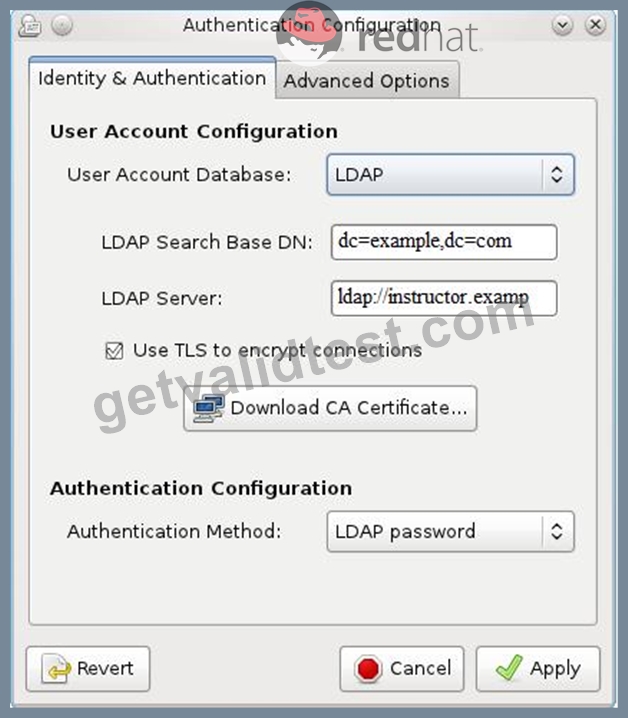
NEW QUESTION # 66
......
Latest 100% Passing Guarantee - Brilliant EX200 Exam Questions PDF: https://braindumps.getvalidtest.com/EX200-brain-dumps.html